
Adult landing page design that keeps clicks and payments flowing
Learn high-converting adult landing page design: proven layouts, builder options, and CPA-friendly patterns with examples, downloads, and usability notes.


Photorealistic beauty portrait paired with a modern adult landing page concept for high-converting signup funnels
Quick answer
If an adult landing page loses people in the first few seconds, the usual problem is not the image or the color palette, it is the page role. A direct landing page, a pre-landing, a promo page, and a marketplace entry page each need a different CTA pressure, a different trust layer, and a different mobile order. Use the wrong one and you get a page that looks fine but behaves like a dead end. This guide gives you the decision rules so you can pick the right layout, see when age verification helps instead of hurts, and avoid teaser mistakes that make adult pages feel interchangeable.
For neutral context, this guide cross-checks the topic against Creator economy and Goldman Sachs Research's creator economy outlook. So the recommendation is grounded in external market signals rather than only product claims.
Adult landing page design starts with the job, not the style
People opening an adult page usually test three things fast: is this safe, is this relevant, and what happens if I tap once. That check happens before the scroll and often before the copy is even read. If the page does not answer those three questions immediately, the visitor treats it as friction and leaves. In practice, that means the first task is page-role clarity, not decoration.
A lot of teams still start from a visual mood board and only later ask whether they are building a direct signup page, a filter page, or a browse-first entry page. That order creates wasted work because the same layout cannot do all three jobs well. As shown in AdultDC. Even adult templates split into different models such as FHG, paysite, and tube layouts because the page role changes what must be shown first.
The distinction matters even more when the landing layer sits in front of a subscription system. A white-label platform such as Scrile Connect handles the business layer after the click — subscriptions, tips, pay-per-view, messaging, and payouts, but the page still has to earn the tap. If the front end tries to do the work of the platform, it gets bloated. If the platform tries to fix a weak page, it gets expensive.
So the first decision is simple: are you trying to close, filter, or orient? Once that answer is clear, the layout choices become easier and the page stops looking like a generic adult design mockup.
What visitors compare before they click
Before the offer becomes real, most visitors compare friction. They look for an age gate, a visible route forward, and a clue about how explicit the next screen will be. That matters because adult traffic often gets judged on the first interaction rather than on the final checkout. A page that makes the path ambiguous can lose 10-15% of click value before the offer is even understood.
On the practical side, that is why quiz pre-landers, warning screens, and age-verification layouts exist. They are not interchangeable decorations. An age gate reduces exposure risk when the source requires a cleaner entry. A quiz helps when the traffic is broad and you need to sort intent before the offer. A warning screen makes sense when moderation or user expectation is the real issue. Copying the mechanism without the job is where most pages fail.
That failure often shows up as a page that is technically correct but emotionally blank. The user sees content, but not direction. The designer sees a polished hero, but the media buyer sees a bounce. In adult funnels, those two views can be miles apart.
Promo page, pre-landing, direct landing, or marketplace entry page?
The cleanest way to reduce confusion is to assign one job to one page type. A direct landing page should move the user to signup or offer completion. A pre-landing should warm traffic and filter the wrong audience. A promo page should sharpen the teaser. A marketplace entry page should reduce search friction and help the user browse.
That last distinction matters more than most leaders admit. A promo page says, “this offer is worth the next click.” A marketplace entry page says, “here is the structure of what you can explore.” If you treat them as the same, you either over-sell a browsing surface or under-sell a conversion page. Both mistakes make the page easier to replace.
For adjacent funnel thinking, the comparison in other sites like only fans is useful because it shows how the platform path changes the page’s job. The page is not the product; it is the handoff into the product system.
| Page type | Primary job | Best CTA pressure | What breaks first | Mobile priority |
|---|---|---|---|---|
| Direct landing page | Take the user to signup or offer completion | High, but clear | Too much text, weak proof, vague next step | One-screen decision |
| Pre-landing page | Warm traffic and filter the wrong audience | Moderate | Overexplaining, slow load, confusing quiz flow | Fast first tap |
| Promo page | Frame the offer and teaser value | Moderate to high | No urgency, no reason to continue | Above-the-fold hook |
| Marketplace entry page | Move people into a catalog or platform entry point | Low to moderate | Feels too salesy, no browsing path | Category clarity |

Teaser balance and trust signals make or break the click
Once the visitor understands the page role, they start comparing how much the page is showing and how much it is hiding. That balance is the adult-specific problem. Show too much and the page can look like the destination itself, which raises moderation risk or makes the page feel lazy. Show too little and the user has no reason to continue. The right line depends on the source, but the rule is stable: show intent, not everything.
AffRoom’s adult pre-landing examples point to the same operational logic. Questionnaires can warm broad traffic when they are short and purposeful. Age-verification screens can screen underage or mismatched visitors when the interaction stays simple. Warning-style pages work when the source needs a clear cue that the content is adult without becoming a full explanation. The wrong move is to copy the device while ignoring the job.
Trust in this vertical is not a generic badge problem. Adult users are deciding whether a page is legitimate, private, and worth another step. That is why the minimum trust layer should be visible: age cue, terms, privacy, and contact. A page with no visible way to check those basics can feel risky even if the creative is strong.
Age verification: useful gate or unnecessary drag?
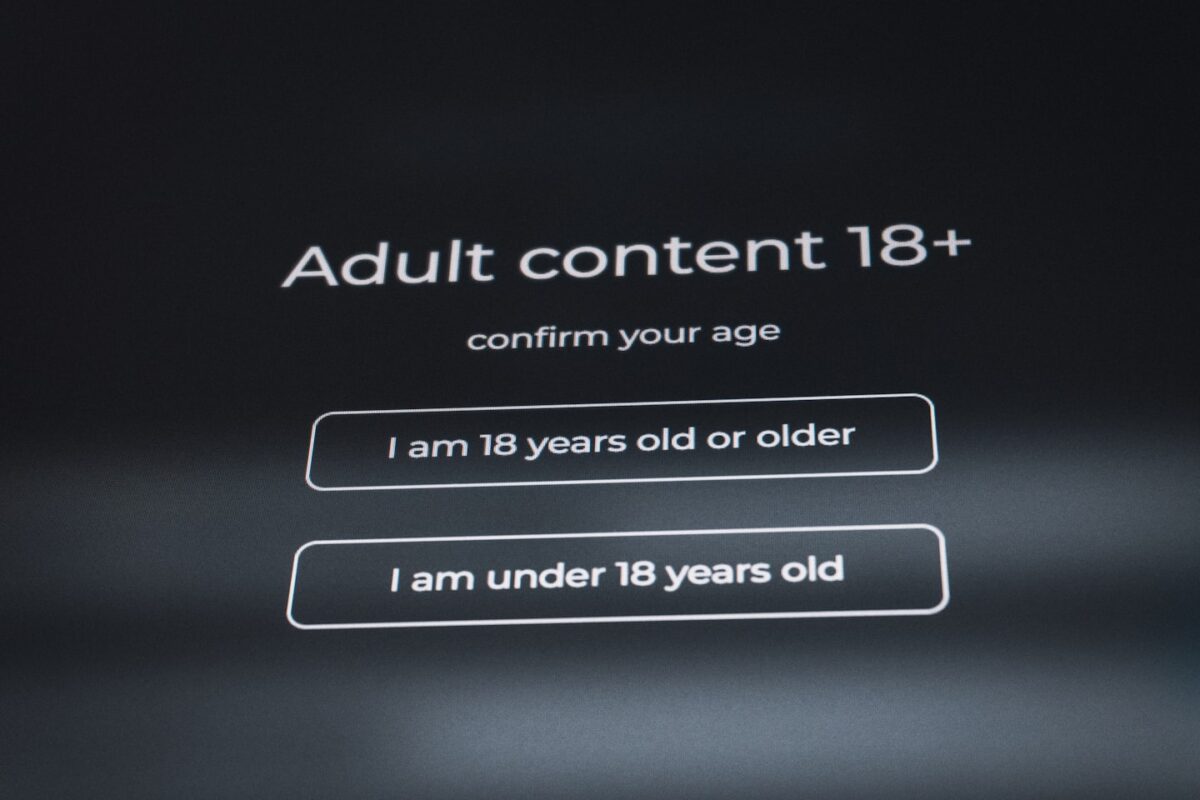
Age verification helps when the entry path needs a short, clean filter before the main offer appears. It hurts when the gate becomes the whole experience and the user never reaches the point of understanding what the page is for. The best version is short, obvious, and paired with a visible reason for the check. The worst version feels like a legal wall.
That minimum-compliance logic is not theoretical. In a DesignCrowd brief for an adult dating age-verification landing page, the task explicitly required a visible age-verification section, two yes/no buttons, and footer links for terms, privacy, and contact. That is the baseline structure, not the full strategy. It is the kind of layout that protects the funnel from looking careless while still keeping the next step obvious.
Teams often overuse age gates because they are easy to add and easy to defend. Then they discover that the gate absorbed all the attention and the page underneath no longer matters. The healthy state is simpler: the gate should confirm eligibility, not replace the teaser.
CTA logic changes with traffic temperature
Cold traffic usually needs less pressure. Warm traffic can handle a sharper CTA because the teaser and the source already match what the user expects. Direct offer traffic should usually see a short route to signup or access, while broader marketplace traffic often needs a softer browse-first prompt. If every visitor gets the same CTA, the page starts losing conversion on the second tap.
The practical test is simple. If the user already knows what they came for, let them act fast. If they are still deciding whether this offer fits them, use a lighter prompt that reduces commitment until the page has earned it. Forcing a signup too early often turns a browse path into a rejection path.
That is also where teams waste hours in rework. Marketing asks for a stronger button, product asks for a calmer entry, legal asks for more visible policy links, and the page gets patched three times in one week. A clean CTA rule prevents that loop.
What the CTA should promise on each page type
On a direct landing page, the CTA should promise access or signup. On a pre-landing page, it should promise continuation, not commitment. On a promo page, it should promise a sharper look at the offer. On a marketplace entry page, it should promise browsing or discovery. The wording can be short, but the promise must match the page role.
Keep the page to one primary action wherever possible. A second button is fine only when it clearly supports the first one. Once a page has three competing actions, it stops being a funnel asset and becomes a menu.
For teams building a subscription business rather than a one-off page, the same logic should map into the platform layer. Scrile Connect is the point where subscriptions, pay-per-view, private calls, messaging, and payouts matter, but only after the landing layer has done its job and moved the right user forward.

Which adult layout fits which job
Most bad adult pages are not badly designed. They are badly assigned. A promo page treated like a direct signup page will feel thin. A pre-landing treated like a sales page will feel slow. A marketplace entry page treated like a hard-sell page will feel pushy. That mismatch is where 15-30% of click value disappears because the wrong friction is being optimized.
| Scenario | Best page type | CTA style | Trust layer | What to avoid |
|---|---|---|---|---|
| Traffic must be filtered before the offer | Pre-landing | Quiz, warning, yes/no gate | Age cue, privacy, clean footer | Long copy, multiple offers |
| Offer needs a stronger teaser before signup | Promo page | One main CTA, one support CTA | Brand cues, short proof block | Excessive explicit detail |
| User already knows the offer and wants action | Direct landing page | Signup or join-now button | Fast load, reduced friction | Multiple detours |
| User should browse a catalog or platform first | Marketplace entry page | Browse, discover, continue | Category labels, navigation clarity | Hard sell too early |
The strongest distinction here is the one between promo page and marketplace entry page. A promo page tries to sharpen desire; a marketplace entry page tries to reduce search friction. If you blur them, you either under-explain the teaser or over-pressure the browsing surface. That is a practical mistake, not a stylistic one.
Adult teams usually discover this after launch, when sales wants more signups and support starts hearing “Where do I go next?” That is the cost of choosing a layout by preference instead of by use case. Once the page role is pinned down, the next build gets faster and the redesign cycle gets shorter.
Mobile-first hierarchy for adult traffic
Most adult traffic meets the page on a phone first, so the top screen has to do real work. It should tell the user what this is, how private or compliant the path is, and what the next tap does. If the first screen looks decorative, the scroll turns into guesswork. Pages that overload the first screen usually lose 25-35% of tap-through because the decision is hidden under styling.
Mobile hierarchy is not about shrinking desktop content. It is about removing delay. A good mobile layout keeps the one thing the user needs to know, moves the trust cue close to the CTA, and pushes everything else below the fold. If a user needs three swipes to understand the page, the page is late.
Above-the-fold order that usually works
Start with a visual cue that matches the offer. Follow with a short line that clarifies the page role. Add the minimal trust cue next — age note, privacy note, or a short compliance line if the traffic source needs it. Then place the primary CTA. Anything else should be secondary.
That sequence matters because mobile users do not forgive hunting. If the main action is below a long text stack, the page feels built for the designer, not for the visitor. If the CTA is too early and the trust cue is missing, the page can feel rushed or unsafe. The order is the decision.
Compress the background text, repeated trust claims, and any long explanation of how the offer works. Keep the primary promise, the age cue if needed, and one visible next step. If the page uses a quiz or age gate, the first tap must be obvious. Most mobile leaks are not dramatic; they are tiny delays repeated across hundreds of visits.
Common mistakes that make adult pages easy to replace
The easiest adult pages to copy are the ones that follow the same generic pattern as everyone else: a hero, a CTA, a trust badge, and a footer. Nothing is wrong in isolation. Together, they become forgettable. In a category where attention is measured in seconds, forgettable pages behave like commodities.
One common mistake is treating age verification as the whole strategy. Another is using a teaser that is either too blunt or too coy. A third is making the mobile version a literal stack of the desktop version. Each mistake hurts for a different reason, but the result is the same: the page stops guiding the visitor and starts looking like a template.
That is also where the cost of inaction becomes visible. A team can spend weeks polishing a visual system and still end up rebuilding after launch because the page role was wrong. A page that feels purposeful is easier to trust and easier to scale. A page that feels copied gets challenged by the user before it can convert.
Failures that usually show up after launch
- Using the same CTA on every screen, so the user never gets a clear next step.
- Hiding terms, privacy, or contact links so deep that the first visit feels risky.
- Writing a teaser that promises everything but explains nothing.
- Making the age gate feel like a legal wall instead of a quick decision point.
Those mistakes often cost immediate click-through, but they also hurt repeat trust. Once people feel the page is built to trap them or rush them, they come back less often. That slow damage is harder to repair than a bad headline because it changes how the brand feels.
What to collect before design or dev starts
Before a designer opens the mockup tool, the brief should answer a few operational questions. What is the page role? Which audience is being filtered? What has to be visible on the first screen? Which links must be present for trust? Without those answers, the page turns into a taste exercise instead of a conversion asset.
The short version is this: pick the page role first, then the CTA, then the trust layer. That order saves rework because it keeps the layout tied to one job. It also makes the review process cleaner. A page built for filtering looks different from a page built for direct signup, and that difference is useful, not accidental.
For a platform-level follow-up, the comparison in Scrile Connect vs Fanvue is useful when the question is what should sit behind the landing layer. The landing page earns the click. The platform keeps the user inside the business.
| Brief field | Owner | What good looks like | Why it matters |
|---|---|---|---|
| Page role | Marketing lead | Pre-landing, promo page, or direct landing page named clearly | Stops wrong-layout builds |
| Traffic source | Media buyer | Source, device share, moderation risk noted | Sets teaser and compliance level |
| CTA type | Product owner | Signup, yes/no gate, browse path, or join-now button | Defines conversion path |
| Trust layer | Legal or ops | Age cue, privacy, terms, contact visible | Reduces friction and confusion |
| Mobile priority | Designer | Top screen order is decided before visuals | Prevents desktop-first mistakes |
What a usable adult page brief should force the team to answer
A good brief does not ask for “a modern adult landing page.” It asks for decisions. What is the exact entry job? What is the minimum trust layer? How explicit can the teaser be before moderation risk rises? Where does the first tap happen on mobile? Those answers are what stop the team from drifting into generic adult marketing language that looks polished but leaves the conversion problem unsolved.
If the funnel ends in a subscription product, the brief should also say what the platform must support after the click. That is where Scrile Connect becomes relevant again: it gives the business layer a place to handle creator branding, memberships, tips, pay-per-view, and private messaging without forcing the landing page to carry that complexity. The page should hand off cleanly; it should not try to be the entire product.
When teams work this way, the result is usually a smaller page, not a larger one. The page becomes easier to read, easier to approve, and easier to test. More importantly, it stops being interchangeable with every other adult creative in the market.
Where Scrile Connect fits this picture
Once the landing layer has done its job, the next bottleneck is usually the platform behind it. That is where Scrile Connect fits: it is a white-label fan platform builder for creators, agencies, and platform owners who need subscriptions, tips, pay-per-view, live streaming, private calls, messaging, and payouts in one branded system. For adult landing page work, that matters because the page can be visually strong and still fail if the monetization layer is fragmented. The fit is strongest when the landing page is not the product itself, but the entry point to a subscription business that needs branding control and adult-content-friendly payment options.
Ready to build the setup behind this?
If this is the operating problem you need to solve, use the product page as the next step. It shows where build your setup fits and what the platform covers beyond a single payment widget.
Frequently asked questions
When does a pre-landing work better than a direct adult landing page?
Use a pre-landing when the traffic is cold, the source is strict, or you need to screen out the wrong audience before the offer appears. A direct page works better when the user already expects the offer and only needs one clear action.
What happens if age verification is the first thing people see?
If the gate feels heavy, some visitors leave before they understand the offer. That risk is lower when the age check is short, visually clean, and paired with a clear reason for the page.
When does a promo page become too thin to trust?
A promo page gets too thin when it has a teaser but no next-step clarity, no trust layer, and no signal of what happens after the click. At that point it feels like a teaser stub, not a real entry point.
How do you know the teaser is too explicit or too vague?
It is too explicit when the page starts to look like the destination itself and creates moderation risk. It is too vague when a first-time visitor cannot guess the offer from one screen.
What risk appears when mobile and desktop layouts follow the same order?
The desktop layout may still look fine while the mobile version turns into a long stack with no clear first tap. That usually increases bounce and makes the CTA feel buried.
When should a marketplace entry page use a softer CTA?
Use a softer CTA when the user is still choosing among categories or creators and does not need to commit yet. If you force signup too early, the page behaves like a sales pitch instead of an entry point.
